Reference Frames
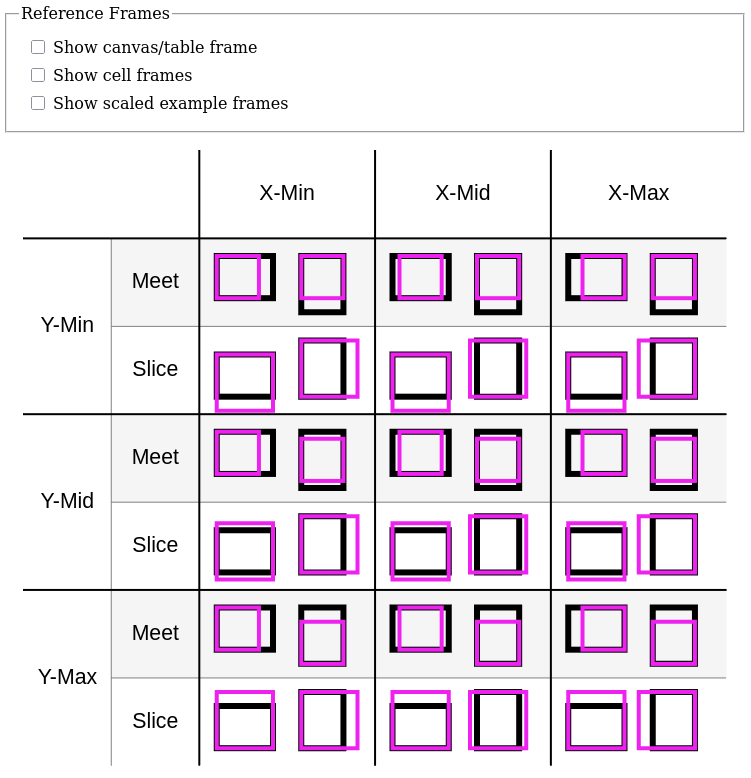
This example demonstrates creating and using reference frames to simplify coordinates, and scaling reference frames with preserveAspectRatio.
It also runs Gesso in a non-Halogen context using plain HTML elements as controls.
Reference Frames and Aspect Ratios
Above the canvas, there are three checkboxes:
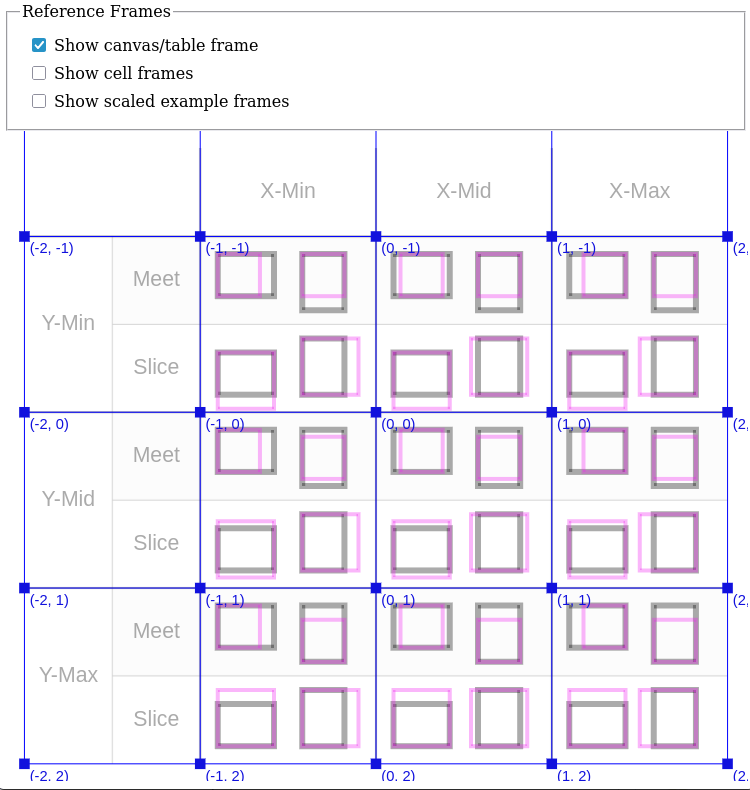
- Show canvas/table frame
- Show cell frames
- Show scaled example frames
Each one toggles showing or hiding a grid that highlights the coordinate systems described here.
Canvas/table frame
The main portion of the drawing is a 4 × 4 table (including the headers), demonstrating the different combinations of:
- X-Min, X-Mid, X-Max
- Y-Min, Y-Mid, Y-Max
- Meet, Slice
- Landscape, portrait
In the view box of the drawing, each cell covers a 1 × 1 square.
Cell frames
Inside each non-header cell, there is a 10 × 10 inner coordinate system that covers a 0.8 × 0.8 square centered in the cell.
Four rectangles are placed in the 10 × 10 grid (two 3 × 4 and two 4 × 3).
Scaled example frames
Each of the four rectangles contains a 1 × 1 square scaled to fit inside it, using different combinations of aspect ratio parameters.
Form Controls
This example uses runGessoAff, awaitLoad, and selectElement, which are Halogen.Aff functions, and runUI from Halogen.VDom.Driver to access the HalogenIO record returned by runUI.
main :: Effect Unit
main = runGessoAff do
  awaitLoad
  container <- maybe err pure =<< selectElement (QuerySelector selector)
  app <- runUI Gesso.Canvas.component
    { name: "frames"
    , initialState
    , viewBox: { x: -2.1, y: -1.6, width: 4.2, height: 3.7 }
    , window: Fullscreen
    , behavior: defaultBehavior { render = render, input = handleInput }
    }
    container
  createControls \q -> app.query (CanvasInput q unit)
  where
  selector = "#frameExample"
  err = throwError $ error $ "Could not find " <> selector
It also uses purescript-web-events and purescript-web-html to create event listeners for the checkboxes and connect them to the HalogenIO record’s query function.
data InputType
  = DrawingGrid
  | CellGrids
  | ExampleGrids

createControls :: (InputType -> Aff (Maybe Unit)) -> Aff Unit
createControls query = do
  createControl (query DrawingGrid) "#drawingGrid"
  createControl (query CellGrids) "#cellGrids"
  createControl (query ExampleGrids) "#exampleGrids"

createControl :: Aff (Maybe Unit) -> String -> Aff Unit
createControl query sel = do
  mElement <- selectElement (QuerySelector sel)
  liftEffect case mElement of
    Nothing -> throwError $ error $ "Could not find " <> sel
    Just element -> do
      listener <- eventListener (handleEvent query)
      addEventListener (EventType "input") listener true (toEventTarget element)

handleEvent :: Aff (Maybe Unit) -> Event -> Effect Unit
handleEvent query _ = launchAff_ $ void query
Sample Output